With Auto-Schedule, your Nest thermostat learns what temperatures you like at different times of the day. After a few days of learning, your thermostat will prepare a schedule for you.
|
This article applies to the following Google Nest thermostat models in the US and Canada: |
|
|
Nest Thermostat E |
Nest Learning Thermostat |
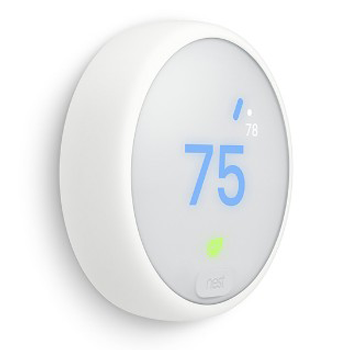

Note: The Google Nest Thermostat doesn’t use Auto-Schedule but you can set a temperature schedule during setup and change it anytime you want, and the thermostat will still learn Time-To-Temperature.
Turn on learning
In order to learn, your thermostat needs to have Auto-Schedule turned on. You can check this setting in the app or on your thermostat.
- In the Google Home app: Tap Favorites
or Devices
touch and hold your thermostat's tile
- In the Nest app: On the Nest app home screen, select your thermostat
- On your thermostat: Go to Settings
 touch and hold your thermostat's tile

Tip: Auto-Schedule learning is on by default, but it's just one option for scheduling temperatures on your Nest thermostat. If you'd like to learn about all the available options, check our article about Nest thermostat temperature schedules.
How your Nest thermostat learns
Note: Nest thermostats learn a different schedule for each temperature mode. For instance, if you currently have your thermostat set to Heat, it’ll learn the temperatures you like for heating your home. If you have both heating and cooling, your thermostat will create separate schedules for Heat, Cool, and Heat•Cool.
Learning on day 1
Your thermostat can start learning your temperature preferences from the day you start using it.
Use the app or your thermostat to select a temperature you want. Your thermostat will remember your choice and add it to the schedule it’s building for you.
While your thermostat is learning, the exact behavior it’ll show depends on what model you have:
- Nest Learning Thermostat: When you adjust the temperature on the first day, your Nest thermostat will hold that temperature until someone changes it. For instance, if you set your thermostat to 70ºF (21ºC), it’ll stay at that temperature until it’s changed.
- Nest Thermostat E: During setup, you’ll have the option to choose a preprogrammed schedule that balances energy savings and comfort.
- If you choose the preprogrammed schedule and also have Auto-Schedule turned on, your thermostat will learn your preferences on top of the preprogrammed schedule. So your thermostat will hold its current temperature until someone changes it, or the next scheduled temperature change, whatever comes first.
- If you choose not to use the preprogrammed schedule, your thermostat will hold the temperature until someone changes it.
- Learn about your options in Nest thermostat temperature schedules.
Learning on day 2
On day 2, your thermostat will continue learning a personalized schedule using any temperatures you’ve set. Your thermostat will also try to learn when you’re home or away by how often you adjust the temperature or walk in front of your thermostat.
If you don’t like the temperature your thermostat learned from day one, simply turn the ring. Any changes you make will help set your schedule for the following days.
Note: Your Nest thermostat starts a new day at midnight. Adjustments made very late at night might not affect your early morning schedule.
Learning after a few days
After a few days, your Nest thermostat will have a decent idea about what temperatures you prefer throughout the day. But it will continue to fine-tune the schedule if you make further adjustments.
Learning after about a week and going forward
After about a week, your thermostat will have learned your temperature preferences and settled on a schedule for you.
It’ll never stop learning, but now will be less sensitive to each change you make. Going forward, your Nest thermostat will only learn from a pattern of at least 2 similar changes.
Here are some examples of patterns your thermostat can learn, and how they’ll change your temperature schedule:
|
Pattern of temperature changes |
How it changes your thermostat’s schedule |
|---|---|
|
2 weekdays in a row, for example, Monday and Tuesday |
All weekdays (Monday to Friday) |
|
Same day 2 weeks in a row, for example, 2 Mondays in a row |
That day of the week (every Monday) |
|
2 weekend days in a row, for example, Saturday and Sunday |
All weekend days (Saturday and Sunday) |
|
2 days in a row including a weekday and weekend, for example, Friday and Saturday |
All 7 days of the week (Monday to Sunday) |
Other learning features
Here are some things you might notice when you start teaching your thermostat what temperatures you like:
- The Nest Leaf: When you turn the ring, you might notice a green leaf
on the thermostat display. This is the Nest Leaf, which appears when you’ve chosen a temperature that’s more energy efficient. You can use the Nest Leaf as a guide to help save energy.
- Time to temperature: Your thermostat can display an estimate of how long it’ll take to bring your home to the temperature you’ve chosen. To learn more about Time-To-Temperature, visit What you’ll see on a Nest thermostat.
- Home and Away: Your thermostat can help save energy by automatically switching to an Eco Temperature when it senses no one’s home. This option will take precedence over your regular temperature schedule. Learn how your home automatically switches to Home or Away.
- Meeting your temperature at the scheduled time: Early-On and True Radiant are learning features your Nest thermostat can use from day one. Which one your thermostat uses depends on what type of system you have, but both do essentially the same thing. They can automatically turn on your system early to meet a scheduled temperature. For example, if you schedule your home to be 70ºF (21ºC) at 7:00 AM, your thermostat might turn on the heat early at 6:00 AM so your home is comfortable when you wake up. Exactly how early it’ll turn on depends on what your thermostat has learned about how quickly your home heats and cools, how efficient your system is, and the weather.
 on the thermostat display. This is the
 Important: If you turn off Auto-Schedule, your thermostat will stop learning. With Auto-Schedule off, if you ever turn the ring to select a new temperature, your thermostat will only hold that temperature until the next scheduled change. It won't add your new preference to the schedule, even if you select the new temperature repeatedly.