Google Nest thermostat energy savings projections are based on data from actual household use of our thermostats, studies and experiments performed by Nest, as well as multiple independent studies conducted by third parties and energy companies. On average, customers who install a Nest thermostat save money on their heating and cooling bills.
This article applies to the following Google Nest thermostat models in the US and Canada:
- Nest Thermostat
- Nest Thermostat E
- Nest Learning Thermostat
How to tell which thermostat you have
Thermostats matter a lot for overall energy use
In the average home, heating and cooling account for about half of energy use as determined by the US Department of Energy. This means that a thermostat that efficiently controls your system can have a significant impact on your home energy use and can reduce your overall energy bill.
In February 2017, the Nest Learning Thermostat became the first programmable thermostat to receive an ENERGY STAR® certification. The newer Nest Thermostat E and Nest Thermostat are now also certified. ENERGY STAR is a U.S. Environmental Protection Agency (EPA) voluntary program that helps businesses and individuals save money and protect our climate through superior energy efficiency.
Ways Nest thermostats can help you save
Here are a few of the ways that Nest thermostats can help reduce the amount of energy used by your heating and cooling system:
Use Eco Temperatures
|
When you first install your thermostat, you'll select The exact temperatures you might pick will vary depending on |
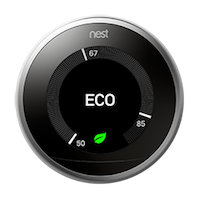 |
Your thermostat can automatically switch to your Eco Temperatures when you leave using Home & Away Routines (Home app) or Home/Away Assist (Nest app). If you’ve chosen energy efficient temperatures, this means that you’ll use less energy because your thermostat won’t turn on your heating and cooling systems as often while you’re gone.
You can also use Eco Temperatures while you’re home to help maximize energy savings.
 |
If you set Eco Temperatures on a Nest |
|
|
If you set Eco Temperatures on a Nest |
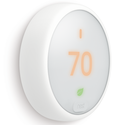
Switch to energy-efficient temperatures automatically when you’re away
|
Home & Away Routines (Home app) or Home/Away Assist When you come back, your thermostat will Note: Along with activity sensors in your thermostat |
 |
Help look after your HVAC system's health
Maintenance can have an impact on your heating and cooling system’s efficiency. For example, you should change out dirty or clogged air filters regularly to help your system run efficiently.
You may need to change it more frequently depending on the type of filter, indoor air quality (which can be affected by things like shedding from pets or outdoor air pollution levels), and how often you run your system. Having dirty or clogged filters can mean that your system has to work harder to move air through your home.
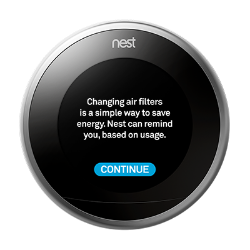
Your thermostat can track the last time you changed your filter and help you remember when it’s time to change it with a Filter Reminder.
 |
 |
Program an efficient schedule automatically
A temperature schedule can help you save energy and reduce your bill (energystar.gov). To help you save energy, keep the thermostat at energy-saving temperatures for long periods of time, for example, when you’re away from home or sleeping.
Programming a thermostat correctly can sometimes be difficult or time consuming. The Nest Thermostat E and Nest Learning Thermostat offer ways to reduce the hassle of programming your thermostat and make it easy to help save more energy: Auto-Schedule (Nest Thermostat E and Nest Learning Thermostat only), the Quick Schedule (Nest Thermostat only), and the Basic Schedule (Nest Thermostat E only). These options can help you save energy by not using your heating and cooling as often or as long as you would without a schedule.
Make small adjustments to save energy
Depending on where you live, you may be able to enroll in a voluntary program called Seasonal Savings through your energy provider. Seasonal Savings allows your thermostat to make small adjustments to your temperature schedule over the period of a few weeks, leaving you with a more energy efficient schedule over time.
Seasonal Savings has helped Nest thermostat users save even more—adding an average of about 3-7% on cooling and 3-8% (depending on the climate where users live) on heating on top of their existing savings for households that opt to participate (source). Individual savings aren’t guaranteed.
Because Seasonal Savings makes changes that are small over a few weeks, you have time to get used to your new schedule. Saving energy is important but you’ll always be in control. If your new temperature schedule is too hot or too cold, you can always change the temperature on your thermostat, change your temperature schedule, or unenroll from Seasonal Savings.
If your energy provider offers Seasonal Savings in your area, you may receive an invitation to turn it on.
Look for the Nest Leaf to help you choose efficient temperatures
The Nest Leaf encourages you to choose more energy-efficient temperatures. The Nest Leaf appears on the thermostat display or in the app when you choose an energy-saving temperature.


The temperatures that earn the Leaf will depend on your temperature preferences, your home, and your schedule. The Leaf will challenge you to choose temperatures that are a little lower or higher than you’re used to.
If you have a Nest Thermostat E or Nest Learning Thermostat, the range of temperatures that earn a Leaf will also change over time as your thermostat continues to learn.
Savings results with Nest thermostats
Multiple studies, including those run by energy companies independently from Nest, have shown that on average customers save 10-12% on heating and 15% on cooling after a Nest thermostat is installed. Based on typical energy costs this means a savings of $131-145 a year.
Where those numbers come from
We looked at the energy bills of real people in 41 states before and after they installed a Nest thermostat, as well as looked at data from 2 independent studies from real homes with real families.
How much energy can you save?
Every home is different. You can expect different savings depending on what temperatures you kept your old thermostat set at, where your home is located, and other factors like insulation and system efficiency. To help provide an estimate for your home, we developed the savings calculator.
The savings calculator helps you find out how much you could save with a Nest thermostat. It will even tell you if there are utility programs in your area that offer rebates or other incentives.
The savings calculator estimates energy savings of the Nest thermostat by using some basic information that you provide. It uses your ZIP or postal code, home size, heating type, and whether or not you have air conditioning.
How different manufacturers calculate savings
Energy savings can be an important part of deciding which thermostat to purchase. But, not all estimates of potential energy savings from a thermostat are created equal.
Different ways manufacturers calculate energy savings
There are a few different ways that energy savings estimates are made.
Manufacturers can:
- Use a model with an imaginary customer and some assumptions to estimate savings.
- Examine real world data before and after installation in real customer's homes.
- Design a controlled experiment to measure energy savings of the thermostat.
- Use a mix of these and other methods.
Take a look at these different methods in more detail:
Imaginary customer to estimate savings
If you’re going to try to understand how much your thermostat can save, you need something to compare it to. In this method, a company will use some assumptions about the average consumer to create a baseline estimate of energy use (without their product). And then will compare it to projected usage with their product.
For example, you could assume that before installing a smart thermostat, a customer keeps their thermostat set at 72 degrees 24/7 all year long. This customer would find significant savings after installing a smart thermostat that has a schedule programmed and can turn down the heating and cooling system when they leave.
With this method, we’ve calculated that installing a Nest thermostat could save the average customer a whopping 25% on their heating and cooling energy use.
However, this savings estimate might be overly optimistic because the average person doesn’t leave their thermostat set at one temperature 24x7 all year long. If you already have a schedule programmed in your thermostat, or if you change the temperature on your own, you probably don’t have as much room to save as this model-based approach would suggest.
Since this estimate does not accurately reflect what real world customers are likely to find, Nest does not generally use this method for determining energy savings numbers.
Real world customers and data to calculate savings
A good way to use real world data to calculate energy savings is to look at customer’s energy bills before and after installing a smart thermostat. Energy bills show your total energy usage, so you can check for decreased energy usage after a smart thermostat is installed.
Other factors, like the weather, can also cause energy use to change significantly, so it’s important to include a control group. A control group is a set of customers, who have similar homes and live in the same area, that continue to use their old thermostat instead of installing a new smart thermostat. Control groups can help adjust for factors like changes in weather to help determine more clearly the amount of energy savings generated by the smart thermostat.
For example, maybe this winter was a lot colder than the last. If you installed a smart thermostat between the 2 winters, you could actually find higher energy use this year because your system has to run more to keep your home at your desired temperature during this colder winter. But, once researchers control for the difference in the weather, they might find that the smart thermostat did help you use less energy than you would have without it.
It’s also important to look at different regions. Some parts of the world are more temperate, and you wouldn’t need to use your heating and cooling very often. This means that even though a smart thermostat could save you energy, it might not reduce your usage as much as it would for someone who lives in an area where heating and cooling usage is high.
By including control groups, accounting for weather and regional differences in heating and cooling, and comparing energy bills before and after a smart thermostat is installed, you can get a clearer picture of total energy savings.
Methods Nest uses to calculate savings
Nest prefers to use real world data and scientific analysis when calculating energy savings to help provide savings estimates that are as close as possible to what you might find in your home.
Not all savings claims are based on scientific analysis or use real world data, and you should keep this in mind when comparing numbers from different manufacturers. Methods that rely solely on using an imaginary customer to estimate savings can result in an energy savings number that is much higher than you’re likely to find in your home.
Energy savings calculations are based on controlled experiments, as well as real world data gathered through multiple studies. For example, each of the customers' utility bills were compared before and after installing a Nest thermostat. This includes several studies that were conducted by utility companies and other third parties independently from Nest. The performance of our thermostats are also tracked using a variety of approaches, including the EPA's Energy Star performance metric developed for smart thermostats.
These studies all used established methods for measuring energy savings. They included methods to statistically adjust weather differences year to year, and control groups to reflect trends in energy use over time.
By using data from real customers and independent studies, we’re able to know that Nest thermostats save energy in real world situations, not just estimates or simulations based on imaginary people. On average, customers who install a Nest thermostat save money on their energy bill, and your Nest thermostat can pay for itself in under 2 years.