Here are answers to some common questions about accounts for the Nest app.
Quick links
Migrate your Nest account to a Google Account
Verify you've migrated your Nest account to a Google Account
Troubleshoot account migration issues
Delete your account
View and download your account data
Migrate your Nest account to a Google Account
Important: If you started using the Nest app after August 19, 2019, you're already using a Google Account and don't need to migrate.
If you started using the Nest app before August 19, 2019, you created a Nest account to manage your Nest products. You now have the option to migrate your Nest account to a Google Account, creating one unified Google Account you can use to manage products and homes in both the Nest and Google Home apps.
If you migrate, your Nest data will be associated with your Google Account. To understand how Google will use your Nest data if you migrate and how you can manage your Google settings, read our Privacy FAQs.
Note: If you use a Gmail address to sign in to your Nest account, you might still need to migrate.
Before you begin
If you migrate your Nest account to a Google Account, your experience of your Nest home and products will change. Migration is optional, and once completed, isn't reversible, so it's important to understand the changes migration will bring before you start.
Here are some key things that'll happen when you migrate:
- You'll no longer be able to use the Nest app on Apple TV or Android TV.
- Home members might lose access and need to be reinvited.
- After migration, home membership is managed with the Google Home app.
- Your data will be handled according to Google's Privacy Policy.
- You'll be subject to the Google Terms of Service and these Nest Terms of Service.
We recommend you read all the information in Important changes when you migrate and Privacy and Terms of Service sections to help decide if migration is right for you at this time.
How to migrate
You can only link one Google Account to one Nest account.
- On your mobile device, download the latest version of the Nest app from Google Play.
- Check you have an eligible Google Account.
- If you don't have one, you'll need to create a new Google Account.
- Open the Nest app
and if asked sign in.
- Tap Settings
- To migrate a different Nest account, tap Sign out
- To migrate a different Nest account, tap Sign out
- Tap Migrate to a Google Account.
- Follow the in-app instructions.

Detailed instructions
- Read the account migration benefits and details carefully.
- When you're ready to migrate, select Continue with Google.
- Choose the Google Account you want to use. We recommend using the same account you're currently using with Google Assistant or Google Home products. You can also create a new Google Account or select Use another account if you have an existing account that's not listed.
- You'll need to allow the Nest app access to specific data from your Google Account.
- Select Info
for more information on what'll be shared.
- Select Allow to start migration.
- Select Info
- Select home members.
- If you're the Owner of a Nest home, home members with Full Access will lose access to the home when you migrate. If they have a Google Account, you can reinvite them either during this step or later with the Google Home app.
- Review Privacy and Terms. We'll explain how Google will use your data and Google's commitment to privacy in the home.
- Learn more about Privacy and Terms of Service:
- Select Complete migration.
- If you're accepting an invitation to join a home, review how your access will change
- If you're accepting an invitation to join a home, review how your access will change
- Select the emails you'd like to receive
- You're all set. Select Done.
 for more information on what'll be shared.
Video instructions
Learn about migrating your Nest account to a Google Account.
Note: Migration instructions begin at 2:17 in the video.Now that you've migrated, when you sign in to the Nest app, you'll use the Sign in with Google button and enter your Google Account credentials.
Verify you've migratedYou can verify you've migrated in the Nest app 
- If you're asked to sign in, select Sign in with Nest
- If you're able to sign in with your Nest account, then your account hasn't been migrated.
- If you're unable to sign in with your Nest account, tap Sign in with Google.
- If you can sign in with your Google Account, then your account has been migrated.
- If you're already signed in, tap Settings
.
- If the "Migrate to a Google Account" option doesn't appear on the screen, then your account has been migrated.
Important changes when you migrate
Homes and family membersWhen you migrate your account, it can affect other members of your Nest home, including their ability to access devices such as locks and thermostats. If possible, discuss account migration with the other members of your home first and migrate together.
Important: If the Owner of a Nest home migrates, all other home members must migrate and be re-invited in order to maintain access to the home.
Once you complete migration, the actions you take in the Home app will be reflected in the Nest app and vice versa. For example, if you remove a member from your home in the Home app, it will remove that member from your corresponding home in the Nest app.
Learn how to share a home and devices in the Home app.
Migration for the Owner of the Nest home
- If you're the Owner of a Nest home, control of your home will work differently after you migrate.
- You'll add and remove home members, except for those with Home Entry Only access, using the Home app.
- You'll only be able to invite home members who have a Google Account.
- Important: In the Home app, each home member can invite or remove other members, including you. That means any member in your home can remove you through the Home app. If this happens:
- You'll lose access to the Nest home.
- All Nest devices you added to the Nest home will be removed.
- If you have a Nest Aware subscription through the Google Store, you'll lose access to it. You'll need to contact support to cancel payment. When that happens, your subscription will be canceled and you'll lose any recorded video history that isn't saved to the Nest app.
- If you have a Nest Secure or Nest × Yale Lock, you can use the Guest Access feature in the Nest app to assign either a Nest Tag or passcode for accounts that can't be migrated.
Migration for Nest home members with Full Access
- If the Owner of a Nest home migrates, you'll need to migrate before they can invite you to a home in the Home app.
- As a member of a home in the Home app, you'll be able to control all devices in the home, change settings, view account and activity history, and add or remove members and devices.
Device control after migration
- After you migrate, you'll still set up and control some Nest Energy, Safety, and Security devices with the Nest app. To find out what app to use, check the setup instructions for the device.
Except for Nest Protect and Nest Tag, these devices will also be automatically linked in the Home app. You'll be able to control some features of these devices with the Home app.
To set up new devices in the Nest app:- Open the Nest app
- Follow the steps in the app.
- Open the Nest app
- You'll set up and control other Nest and Works with Google Home (formerly Works with Hey Google) devices with the Home app.
Learn how to set up smart devices in the Home app.
Android TV and Apple TV
Nest Aware
If you migrate to a Google Account, you shouldn't experience disruption to your existing Nest Aware subscriptions.
Nest and Home apps
You'll use the Nest and Home apps for different actions after migration, as follows:
| Things you can do in the Nest app | Things you can do in the Home app | |
|
Invite users with existing Nest accounts to join your unified Google Nest home Note: The user must first migrate to a Google Account. |
|
|
| Invite users with Google Accounts to join your unified Google Nest home |
|
|
| Remove a home member from your unified Google Nest home |
|
|
| Rename or delete your unified Google Nest home |
|
|
| View your unified Google Nest home family members |
|
|
| Control Energy, Safety, and Security Nest products |
|
|
| Control all other Google connected home devices |  |
|
| Control Works with Google Home | |
*Note: Nest Protect and Nest Tag will only appear in the Nest app. Some features on other products are also currently only available in the Nest app. Some cameras, doorbells, and thermostats can only be set up and controlled in the Google Home app.
Changes to policies and Terms of Service
Once you migrate, you'll be subject to the Google Terms of Service as supplemented by these Nest Terms of Service. The Google Privacy Policy and Nest Privacy FAQs explain how your data will be handled. Please also read Google's commitment to privacy in the home.
Learn about Data, Privacy, and Terms of Service for migrated Google Accounts.
If you don't migrate your Nest account, you'll remain subject to existing terms and privacy policies of Nest Labs, Inc. If there are any changes to our existing offerings available to you, we'll make sure to keep you informed.- Learn how to create a Google Account.
- Google Nest will send all email communications about your unified home to the email address in the Google Account you use for migration.
- You aren't able to migrate a Nest account to the following types of Google Accounts:
- Google Accounts already linked with another Nest account
- Google Workspace accounts (formerly G Suite)
- Group and alias accounts
- Google Accounts for children under 13 (or the applicable age in your country)
- Unverified Google Accounts
Troubleshoot account migration issues
If you're having trouble migrating your Nest account to a Google Account, look for your issue in the following list.
Error message: Google Account is already linked with another Nest account.
You can link only one Google Account to one Nest account. If the Google Account you want to migrate to is already linked with a Nest account, you have 2 options. You can either:
-
Use the Google Account that's linked to another Nest account:
- Sign in to the Nest app with your Nest account.
- Disconnect all your devices.
- Sign out of the Nest app.
- Select Sign in with Google
- Reconnect your devices.
- Use a new Google Account:
- Create a new Google Account.
- Migrate your Nest account to the new Google Account.
It's not possible to unlink a Google Account and Nest account that've already been linked to each other.
Error message: Google Workspace accounts can't be migrated.
Error message: Group and alias accounts can't be migrated.
Error message: Google Account is managed by a parent or guardian.
Error message: Google Account has not been verified.
I don't see all my homes or devices in the apps.
Note: Nest Protect and Nest Tag will only appear in the Nest app.
Make sure you're logging in with the same Google Account you migrated to. To verify you're using the correct Google Account, go to myaccount.google.com/permissions 
After migration, your homes and devices list might not be up to date in the Home or Nest apps. If this is the case, force close both apps and open them again:
- Pull up your open apps:
- Depending on your phone model, you'll do this by swiping up from the bottom of the screen, double-tapping your home button, or tapping the square button on the bottom right of the screen.
- Swipe left or right to find and select the app you want to close.
- Swipe up on the app window to close the app.
- Reopen the app.
If the Owner of the home in the Nest app left or was removed, the Nest devices that were paired to the Owner's account are also removed. To add the missing Nest devices back to the home, factory reset the Nest devices and set them up again.
I can't sign in to the Nest app.
- Make sure you select "Sign in with Google" and use the Google Account you migrated to.
- Update the Nest app.
- Note: If you use the Nest app on multiple devices, make sure you update the app on all devices.
- Log out of your device, then log back in again.
- Uninstall and reinstall the Nest app.
Data, Privacy and Terms of Service for migrated Google Accounts
- The following articles explain how Google handles your data:
- Google Privacy Policy
- Privacy FAQs
- Google's commitment to privacy in the home
- This article explains how to download your Google Account data: How to download your Google data
- This article explains what happens if you delete your Google Account: How Google retains data we collect
- The following articles explain the Terms of Service you are subject to when you use Nest products:
Privacy and Terms of Service migration screens
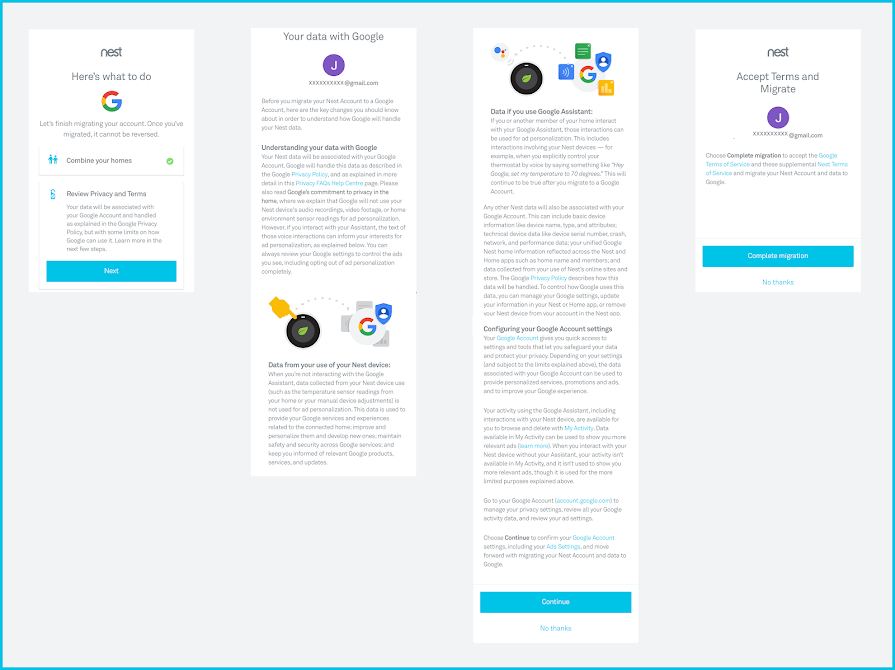
Delete your account
What happens when you delete your accountIf you sign into the Nest app with a Google Account
To understand what happens to your data when you delete your Google Account, you can read Google's data retention policies, including how long it takes Google to delete your information, including your Nest data.
If you're a non-migrated Nest account user
When you delete your Nest account, we remove your personal information according to Nest's Privacy Statement.
Deleting your account will also limit the way in which you can use your Nest products. Here are some of the things you'll miss out on:
- You won't be able to control any Nest products through the Nest app on your phone, tablet, or computer.
- You'll no longer receive notifications or emails from Nest about your Nest home.
Important information about specific Nest products
Nest thermostat
When you delete your account, your Nest thermostat will still be able to change the temperature in your home, sense motion to determine whether to switch to Eco Temperatures, let you choose an automatic or manual schedule, and use other basic functions.
It'll also remember your Wi-Fi information. This means it can stay connected to the internet and continue to communicate with our servers. It might also receive software updates. The thermostat will send data and its originating IP address to our servers as long as it's connected to the internet. If you don't want data logging and software updates to continue, you should disconnect your thermostat from your Wi-Fi network.
Nest camera or doorbell
Nest cameras and doorbells won't work without an account. If you delete your account, you won't be able to use your Nest camera or doorbell until you add it to another account in the Nest app.
If you have a Nest Aware subscription
When you delete your account, your camera's video history will be erased including markers and snapshots on the Sightline in the Nest app. Once your video history and snapshots are deleted, they're gone forever. They can't be recovered. We don't keep backups. In addition, if your camera was using familiar face alerts, your familiar faces data will be deleted.
After deleting your account, you might need to cancel your Nest Aware subscription as well:
-
If you purchased Nest Aware directly from Nest, deleting your account will cancel your Nest Aware subscription at the same time. No further action is needed.
-
If you purchased Nest Aware through one of our partners, contact the partner to cancel your subscription. For more information, including how to tell if you purchased your subscription from a partner, visit our FAQs about Nest Aware from our partners.
Tip: If you just want to delete your video history without deleting your account or canceling Nest Aware, go to Delete video history and snapshots.
Nest Protect smoke and CO alarm
After you delete your account, Nest Protects that were previously wirelessly interconnected will still work. However, if you want to interconnect new Protects, you'll need to add all your Protects to an account in the Nest app.
Nest Protects will remember your Wi-Fi information after you delete your account. This means they can stay connected to the internet and continue to communicate with our servers. They might also receive software updates. If you don't want your Protect to continue receiving updates, reset your Protect to factory settings.
Important: If you factory reset Protects that are wirelessly interconnected, it'll disable the connection.
Nest Secure alarm system
When you delete your account, Nest Secure will stop working until you add it to another account in the Nest app.
In addition, if you subscribe to one of the services listed below, you might need to cancel the service separately.
If you subscribe to cellular backup
When you delete your account, your cellular backup subscription will either be automatically canceled if you purchased it directly from Nest, or you might need to cancel it manually if you purchased it from one of our partners. For more information, go to Purchase or cancel cellular backup for Nest Secure.
If you subscribe to professional monitoring
When you delete your account, you'll need to cancel your professional monitoring service separately. Contact your professional monitoring service to cancel your subscription.
Nest × Yale Lock
After you delete your account, your Nest × Yale Lock can still work as a basic keyless lock, but you'll need to do everything on the lock itself. Be sure to reset your lock to factory default so you can add and delete passcodes and change settings directly on the lock itself.
You won't be able to use the Nest app to control your lock any more, including things like managing passcodes, setting entry schedules, viewing history, and locking or unlocking your door remotely.
If you sign in with a Google Account
- Learn how to download your data.
- Learn now to delete your Google Account.
If you have an existing, non-migrated Nest account
- Sign in to your account using a phone, tablet, or computer.
- Tap Settings
- Select Account
Manage Account.
- Tap Delete Account, then confirm that you'd like to delete your account.
- You'll receive an email from account@nest.com. Read the entire email, then click the provided link to finish the account deletion process.
 Manage Account.
View and download your account data
How do I access my information from Nest?
In the Nest App
You can use the Nest app to:
- View your account settings and edit your profile information
- View data, such as your Energy History, Video History, and Security History
- Non-migrated Nest accounts only: Add or remove homes and control who shares access to your home
Note: If you've previously purchased Nest Aware at the Nest Store, you can sign in and check your Nest Store order history.
In the Google Home app (for migrated accounts)
You can use the Google Home app to:
-
Add or remove homes and control who shares access to your home.
How do I download my information from Nest?
If you're using a Google Account, learn how to download your data.
If you're using a non-migrated Nest account, we give you the option to download your data using My Nest Data.
To learn more about privacy and your data, read our Privacy FAQs.