Google Nest thermostats do more than let you change the temperature. They also let you know what's happening. For instance, your thermostat can show you important notifications about issues with your system, the ambient temperature, the temperature your system is set to reach, and more.
Here's a complete guide to all the symbols, icons, numbers and more of what will appear on your thermostat.
|
This article applies to the following Google Nest thermostats models: |
|
|
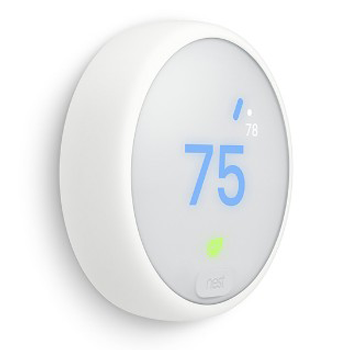
Nest Thermostat E |
Nest Learning Thermostat
|
|
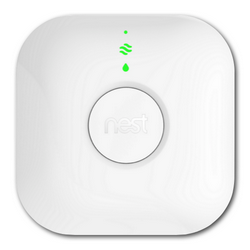
Thermostats that have the Heat Link |
|
  |
  |
| How to tell which thermostat you have | |
|
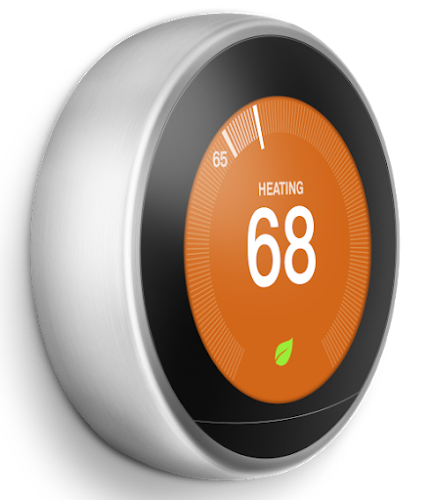
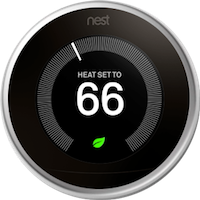
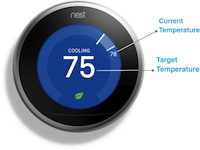
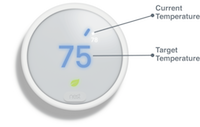
The temperature screen This is what you'll see and use most often. You'll see the current ambient temperature, the temperature your thermostat is set to (the Target Temperature), and icons like the Nest Leaf when relevant. |
 |
|
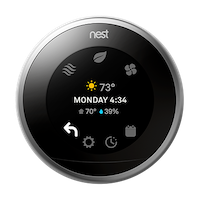
The Quick View menu Press the ring on your thermostat to switch from the temperature screen to the Quick View menu. Here you can change your thermostat's mode (from heating to cooling, for instance) and dig into settings where you can change your temperature schedule, update the Wi-Fi network, and more. |
 |
|
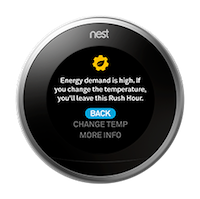
Notifications and errors If there's a problem or something important you should know, a message will pop up on your thermostat or in the app. There may also be an icon on the temperature screen after the message goes away. |
 |
|
Farsight 3rd gen Nest Learning thermostats also have Farsight. Farsight shows you practical information such as the time, the weather or the temperature, in a large format that's easy to read from across the room. |
 |
The temperature screen
The basics
 |
 |
|
|
Nest Learning Thermostat
|
Nest Thermostat E
|
|
 |
 |
|
| Nest Learning Thermostat | Nest Thermostat E |
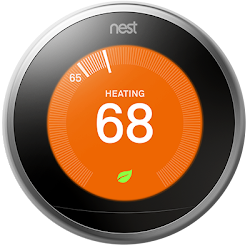
- The temperature screen will show you the current temperature in your home, and the temperature your system is set to.
- The small number near the edge of the screen is the Current Temperature measured by your thermostat's sensors. If you have a Nest Temperature Sensor that's currently active, you'll see the temperature measured by the sensor, which is typically located in a different room from the one your thermostat is in.
- The large number in the center of the screen is the Target Temperature. This is the temperature your system is set to heat or cool to. Turn your thermostat's ring clockwise or counterclockwise to adjust the Target Temperature.
- You'll see "ECO" and the Nest Leaf icon instead of a number indicating the temperature when your thermostat is set to Eco Temperatures to help save energy.
- Icons will appear at the bottom of the temperature screen to let you know what's happening. For example, the Nest Leaf appears when you've selected an energy-saving temperature. Refer to the icons section below for details.
- The color will change between orange (heating) blue (cooling) and black (off or ECO) depending on your system's current state. You may also see a message like "Heat set to" or "Cooling."
- The thermostat screen will turn off when it notices that there hasn't been any recent activity nearby. If you've enabled Farsight, the screen will switch to the option you've selected (the room temperature, time, weather, etc.).
- Important notifications such as an error, issue with your system, or an upcoming energy Rush Hour will be automatically shown on the temperature screen. You can manually dismiss most notifications, except critical errors. Notifications will automatically disappear after a while, or when the issue is resolved.
- Press the thermostat to manually switch to the Quick View screen if needed. Remember, Nest thermostats don't have touchscreens, press down until you hear a click.
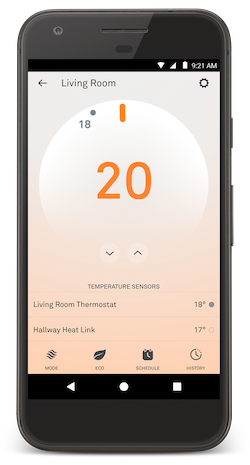
- You can also find the temperature screen in the Nest or Google Home app. Just tap your thermostat on the Nest or Home app home screen to bring it up. There are some key differences between what you'll see on your thermostat's temperature screen and the one in the app.
Differences between the app and thermostat temperature screens
|
When you manually change the temperature on your thermostat or with the app, you'll see approximately how long it will take for your home to reach the temperature you've chosen. Your Nest thermostat will estimate the Time-to-Temperature in increments of five minutes. If it's less than ten minutes until the temperature you've selected is reached, the display will read, "less than ten minutes." If it's more than two hours, Nest will read "IN 2+ HR." |
 |
Once the target temperature is reached, the Time-to-Temperature will disappear, and the screen background will turn from orange (heating) or blue (cooling) to black.
The Time-to-Temperature estimate will get more accurate as your thermostat continues to learn how your home warms up and cools down.
When Time-to-Temperature won't appear
-
Time-to-Temperature estimates will only appear for temperatures that you've manually set with the thermostat or the Nest or Home app. Temperatures that you've put into your schedule and temperatures added by Auto-Schedule won't have a Time-to-Temperature displayed.
-
Your Nest thermostat won't display a Time-to-Temperature estimate if continuous heating or cooling is needed to maintain the temperature that you've selected, or if the temperature fluctuates unexpectedly. For example, if you have a poorly insulated home and an extreme cold front rolls in, your heating system might have to constantly cycle to keep the temperature up. In this case, the display will simply read "HEATING" without a time.
There are some differences between what will appear in the Nest or Home app and on your thermostat. The app has some extra options for system controls, the current humidity in your home, and information about all the temperature sensors connected to your thermostat.
On your thermostat:
- Whether your system is heating, cooling or idle
- The target temperature that your system is set to heat or cool to
- Fan (when it's running)
- Time-to-Temperature
- Nest Leaf (depending on target temperature)
- Eco (when thermostat switches to Eco Temperatures)
In the Nest or Home app:
- System Mode (to switch between Heat, Cool, Heat • Cool, Eco and Off modes)
- Fan control (to manually turn your system's fan on and off)
- Schedule (to change the temperature schedule)
- History (to view your Energy History)
- The current humidity in your home
- Settings (to change Eco Temperatures, set a fan schedule, and more). Note: Some settings are only available in the Nest app. Temperature Lock, Farsight, and Humidifier/Dehumidifier are now available in the Home app.
- Nest Temperature Sensors that are connected to your thermostat (Nest app only). This will also include the temperatures they're reporting and useful information like "Room tends to be cooler than at the thermostat," or "Weak connection to the thermostat" if you may need to move it closer.
 |
 |
| Nest Learning Thermostat | Nest Thermostat E |
The icons below appear when needed. However, this will depend on your system as well as whether you've opted into an energy savings program. So, you may not see one or more of them at all.
|
Nest Leaf  |
This icon will appear when your thermostat is set to an energy efficient temperature. Use the Nest Leaf as a guide to help you save energy. |
|
Rush Hour Rewards  |
This icon appears during either a Rush Hour or Seasonal Savings event. |
|
Fan  |
If you can turn on your system's fan independently of heating or cooling, the fan icon will appear on the temperature screen when it's running. |
|
Airwave  |
This icon will appear on your temperature screen if your Nest thermostat is using Airwave to help save you energy. |
|
Humidity  |
This icon is displayed on the temperature screen whenever your Nest thermostat is using your system to adjust the humidity in your home. This icon will only appear if you have a humidifier or dehumidifier installed on your thermostat. You can set times when your humidifier or dehumidifier won't run, so they won't disturb you. Learn How to change Quiet Time settings. |
|
Sunblock  |
This icon will appear when Sunblock uses your Nest thermostat's light and temperature sensors to help keep you comfortable. |
|
The Quick View menu gives you easy access to important settings and information about your thermostat. Press your thermostat's ring to open the Quick View menu. It will show you several options to choose from, each represented by an icon. Turn the ring and press to select the one you want. |
|
|
Done |
Select this icon and the current time and day of the week will appear as well as the temperature and humidity in your home. Note: If your thermostat isn't connected to Wi-Fi, you won't find weather information. Select this icon and press the thermostat ring to return to the temperature screen. |
|
Off Heat Cool Heat•Cool |
Select the mode icon to choose whether your thermostat uses heating, cooling or both to keep your home comfortable. The available modes will depend on your equipment. So example, you'll only see Cool and Heat • Cool modes if your thermostat is connected to central air conditioning. The color of this icon will change so you can easily tell what your thermostat is set to. |
|
Eco |
Your thermostat will automatically switch to Eco Temperature when your home is unoccupied to help save energy. You can also manually set it by selecting this icon. |
|
Fan |
This icon will appear only if your system has a fan that can be controlled separately from heating and cooling. Select this icon to turn your fan on or off right away, or set a daily schedule. |
|
Energy |
Select this icon to bring up a quick summary of yesterday's energy use if it's available. Press the thermostat ring to see more details about your Energy History for the last 10 days. Note: If you have a Nest thermostat E, you'll find History under Settings |
|
Schedule |
Highlight this icon to show the next upcoming temperature in your schedule. Select this icon to view and change your weekly schedule. Note: If you have a Nest thermostat E, you'll find Schedule underSettings |
|
Settings |
Settings is where you can change your thermostat's options and view detailed information that can help you troubleshoot problems. Select this icon to access and change thermostat settings like screen brightness, Eco Temperatures, network connection, and more. |
|
Exclamation point |
Note: If the thermostat is offline, you'll see an exclamation point inside the Settings icon. You can still control your heating and cooling with the thermostat, but you won't be able to control the temperature with the Nest app. |


 instead.


The 3rd generation Nest Learning Thermostat can automatically wake up and switch to the Farsight screen when there's activity within 20 feet. The Farsight screen shows you useful information in a large format that makes it easy to read even from the other side of the room.
Things Farsight can show you
|
You can choose what Farsight shows you, or turn it off in your Nest thermostat's settings:
Note: No matter which Farsight setting you choose, your thermostat will always go to sleep to conserve power, and show you important messages such as smoke and carbon monoxide alerts from your Nest Protect, Furnace Heads-Up, or any other error or alert that requires your attention. |
 |
Farsight changes when you get closer to your thermostat
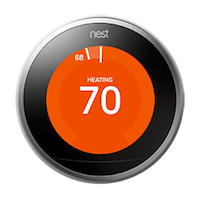
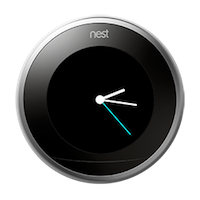
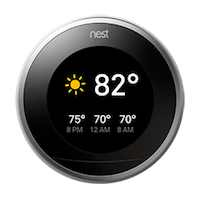
When the Farsight screen is active, it will automatically show you more details when you get closer to your thermostat, within about 3 feet. Below are examples of what will appear, depending on your Farsight setting.
Note: To exit Farsight and use your thermostat to change the temperature or other settings, press on your thermostat or turn the ring.
|
Farsight setting |
Far |
Near |
|
None (off) |
|
|
|
Target temperature |
|
|
|
Current room temperature |
|
|
|
Analog clock |
|
|
|
Digital clock |
|
|
|
Weather and forecast |
|
|




Farsight is disabled when your thermostat's battery is low
Your thermostat charges its internal battery with the power it gets from the wires connected to your system. It closely monitors its internal battery charge level, and if the charge gets too low, your thermostat will take energy saving measures to help ensure you have full control of your heating and cooling, and access to critical thermostat features.
When the charge gets low enough, Farsight will automatically turn off until the battery recharges. You'll still be able to use your thermostat as usual, but the display will only turn on when you're within about 3 feet. After your thermostat has had a chance to recharge its battery enough, Farsight will work again.
Why only 3rd gen Nest Learning Thermostats have Farsight
- 3rd gen thermostats have advanced sensors needed to sense your presence from farther away.
- Farsight takes advantage of the larger, high-res screen on the 3rd gen thermostat so it's easy to read.
Note: Farsight is available only on 3rd gen Nest Learning Thermostats with software 5.0 or later installed.
How to change Farsight settings
By default on the 3rd gen Nest Learning Thermostat, Farsight is turned on and set to show you the target temperature. You can turn Farsight off or change what it shows you on your thermostat's screen or in the Home app.
On your thermostat
- Press the thermostat ring to open the Quick View screen.
- Turn the ring to Settings
and press to select.
- Select Display
Farsight.
- Choose what Farsight will show you. To turn it off, select None.
 Farsight.
In the Home app
- Open the Home app
- Tap Favorites
or Devices
- Tap your thermostat
- To turn Farsight on or off, tap the switch next to "Use Farsight."
- Tap the feature that you want Farsight to show when it's active. You can choose the temperature, a clock or the weather.

Error codes and notifications
|
You'll find messages on your Nest thermostat about things that you should know and may need your attention. Certain thermostat errors and notifications will also appear in the Nest or Home app. |
|
Here's a short list of key notifications that may appear on your thermostat:
- Energy Rush Hour
- Seasonal Savings
- Safety Temperature
- Furnace Heads-Up
- Air filter reminders
- Thermostat error codes
Your thermostat will show you an error message when it detects a problem with things like wiring, Wi-Fi, or power.
Sometimes you can dismiss an error code if it's non-critical. However, it may come back if the problem persists. Other issues that require your immediate attention will remain on your thermostat until the problem is fixed.
Troubleshoot error codes: When you see an error code, your thermostat will tell you a bit about the problem. To get help with a specific thermostat error message, make a note of the code in the message ( typically a letter followed by two numbers) and look it up in our troubleshoot thermostat error codes article for specific troubleshooting steps.