Depending on your system type and thermostat model, your Google Nest thermostat can have up to 5 available modes: Heat, Cool, Heat • Cool, Off, and Eco. This article covers what each mode does and how to manually switch between them.
Important things to know:
- Your thermostat can automatically switch between modes, but you can also manually set the mode you want.
- Both your thermostat and system will behave differently, depending on what mode your thermostat is set to.
- Heat, Cool, and Heat • Cool modes each have their own temperature schedule.
Switch to Heat, Cool, Heat • Cool, or Off mode
Important: Heat, Cool, and Heat • Cool modes each have their own temperature schedule. When you switch modes, your thermostat might turn your system on and off at different times, depending on the mode’s schedule.
Google Home app
- Open the Google Home app
.
- Tap Favorites
or Devices
.
- Tap your thermostat.
- Tap the Temperature mode icon. The icon will be different, depending on what mode your thermostat is currently in.
- Choose the mode you want to use.
 .
.Nest app
Note: The Nest app is only compatible with the Nest Thermostat E and Nest Learning Thermostat.
- On the home screen, select your thermostat.
- Tap Mode
.
- Choose the mode you want.
On the thermostat
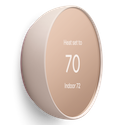 |
Nest Thermostat: Set to Heat, Cool, Heat • Cool or Eco mode
Set to Off mode
|
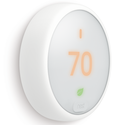 |
Nest Thermostat E:
|
 |
Nest Learning Thermostat:
|
 tap the touch bar to select.
Switch to Eco Temperatures
You can quickly switch your thermostat to Eco Temperatures much like you switch to other modes. For complete details on how Eco Temperatures work please go to Learn about Eco Temperatures.
Google Home app
|
|
|
|
Nest Thermostat E or Nest Learning Thermostat:
|
Nest app
Note: The Nest app is only compatible with the Nest Thermostat E and Nest Learning Thermostat.
- On the home screen, select your thermostat.
- Select Eco
.
- Tap Start Eco. If you have more than one thermostat, select whether you want to start Eco Temperatures only on the thermostat you’ve chosen or all thermostats.
On the thermostat
Note: You can switch to Eco directly on the Nest Thermostat E and Nest Learning Thermostat only. The Nest Thermostat does not have Eco mode. Instead, you can use the Eco preset in the Home app as your Nest Thermostat heats or cools your home.
- Press the thermostat ring to open the Quick View menu.
- Turn to Eco
- Select Start Eco.
Note: If your thermostat is already set to Eco, select Stop Eco and your thermostat will return to its regular temperature schedule.
What each mode does
Important things to know
- Your thermostat can automatically switch between modes, but you can manually set the mode you want too.
- Both your thermostat and system will behave differently depending on what mode your thermostat is set to.
- You may not find all 5 modes in the app or on your thermostat. For instance, if your home only has a heating system, you won’t find Cool or Heat • Cool.
| Home app | Nest app | |
| Heat | ||
 |
 |
|
| Cool | ||
 |
 |
|
| Heat • Cool | ||
 |
 |
|
| Off | ||
 |
 |
|
| Eco | ||
 |
|
|
| Preset | ||
 |
|
|
Note: Heat, Cool, and Heat • Cool modes each have their own temperature schedule. If you want to make changes to the schedule, be sure you select the right one.
How Eco temperatures work
For the Nest Thermostat, you can use the Eco preset to quickly adjust to energy-saving temperatures manually or in its temperature schedule.
- When you manually set the Eco preset, it’ll be overridden by the next temperature set in the schedule.
- If you want to use Eco temperatures for longer without changing the temperature schedule, you can hold the Eco preset temperature.
For the Nest Thermostat E and Nest Learning Thermostat, you can switch to Eco the same way as other temperature modes. However, there are some key differences in how your thermostat will behave in Eco compared to other modes:
- When you manually switch to Eco, your thermostat will ignore all scheduled temperatures until you manually switch it back to heating or cooling.
- If your thermostat automatically switched to Eco Temperatures because everyone was away, it’ll switch back to your normal temperatures when someone comes home.
Learn about Eco Temperatures and how to change settings